 Learning Tools Launcher
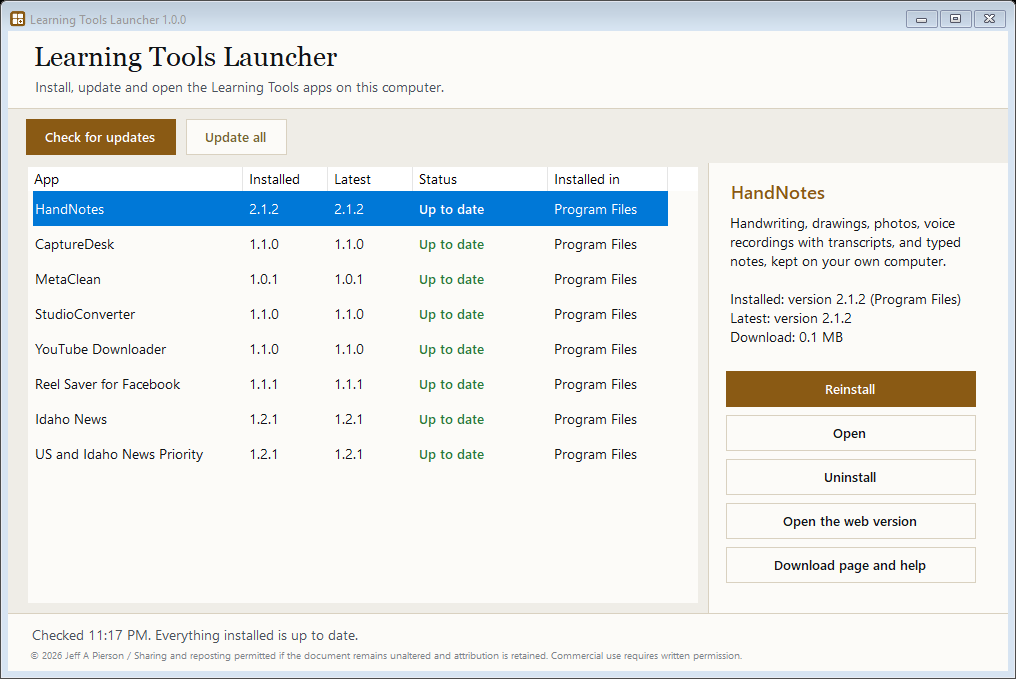
One small Windows program that installs, updates, opens and uninstalls every Learning Tools desktop app. It shows which apps are on this computer, which version each one is, and whether a newer version is on jeffapierson.com. Pick an app and press Install or Update: the launcher downloads the official installer, checks it against its published SHA-256 fingerprint, and runs it.
Download LearningToolsLauncher-Setup-1.0.0.exe (2.0 MB) All tools
SHA-256: c846ad5677886b1d42f2e1ee4ac83c05b5bea9f116bae8b222043ffdb05f4bc5
How it works
/downloads/learning-tools-apps.json.Install the launcher
- Download
LearningToolsLauncher-Setup-1.0.0.exeabove. - Run it. Windows asks for administrator permission because it installs into
C:\Program Files\Learning Tools Launcher. - The installer is not code-signed, so SmartScreen may say "Windows protected your PC." Choose More info, then Run anyway. You can compare the SHA-256 above first: in PowerShell,
Get-FileHash .\LearningToolsLauncher-Setup-1.0.0.exe. - Open Learning Tools Launcher from the Desktop icon or the Start menu.
Needs Windows 10 or 11 (64-bit) and .NET Framework 4.8, which Windows 10 and 11 already include. Nothing else to install.
Using it
- Check for updates gets the current list of apps and versions. The launcher never checks on its own.
- Install or Update downloads, verifies and runs the selected app's installer. Update all does every app that has a newer version, one after another.
- Open starts the app from its Start menu icon. Uninstall runs the app's own uninstaller, which asks before it removes anything.
- Open the web version and Download page and help go to the app's pages on this site.
- Updates keep your settings and data. Each app keeps its data outside Program Files.
Apps it manages
| App | What it is | Page |
|---|---|---|
| HandNotes | Handwriting, drawings, photos, voice recordings and typed notes on your own computer | Download page |
| CaptureDesk | Capture web pages, documents and media with AI summaries into a folder you choose | Download page |
| MetaClean | Removes hidden metadata from photos, documents and media before you share them | Download page |
| StudioConverter | Converts audio and video files for the studio tools | Download page |
| YouTube Downloader | Saves videos and audio you have the right to keep | Download page |
| Reel Saver for Facebook | Browser extension for Chrome or Edge, installed with a Windows setup | Download page |
| Idaho News | Idaho news reader for Windows | Download page |
| US and Idaho News Priority | Ranks US and Idaho news by priority, for Windows | Download page |
New apps appear in the launcher as soon as they are added to the public app list. If a newer launcher is out, the status line says so after Check for updates.
Uninstall
Settings > Apps > Installed apps > Learning Tools Launcher > Uninstall, or Start menu > Learning Tools Launcher > Uninstall. Removing the launcher leaves every app it installed in place. Downloaded installers are kept in %LOCALAPPDATA%\LearningToolsLauncher\downloads; you can delete that folder yourself to free space.
Learning Tools Launcher 1.0.0 · October 22, 2026 · © 2026 Jeff A Pierson / Sharing and reposting permitted if the document remains unaltered and attribution is retained. Commercial use requires written permission.